
Download Terrasketcher – AI‑Powered Sketch to Cloud Diagram Converter
Overview
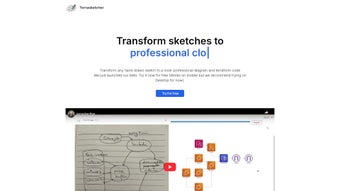
Terrasketcher is a cutting‑edge, web‑based AI application that instantly transforms hand‑drawn sketches into polished cloud diagrams. Targeted at IT architects, cloud engineers, DevOps teams, and design directors, the tool eliminates the tedious manual work of recreating whiteboard ideas in a digital format. By simply uploading a photograph or scanned image of a sketch, Terrasketcher’s deep‑learning engine analyses shapes, symbols, arrows, and relationships, then rebuilds them as vector‑based diagrams ready for export as SVG, PNG, or PDF.
Because the entire process runs inside a modern browser, there are no heavyweight installers, no local system requirements, and all data remains encrypted during transmission and processing. Whether you’re mapping a multi‑region AWS architecture, visualizing a hybrid‑cloud strategy, or sketching a quick network layout on a napkin, Terrasketcher delivers a fast, secure, and cost‑effective solution. The AI works best with clear, well‑structured sketches, yet even rough drafts can be refined with a few manual tweaks after conversion.
This seamless bridge between analog brainstorming and digital documentation helps teams accelerate design validation, improve stakeholder communication, and maintain a consistent visual language across all cloud projects.
Key Features, Benefits, Pros & Cons
- AI‑Driven Recognition: Advanced computer‑vision models identify cloud icons, arrows, and grouping structures from hand‑drawn inputs.
- Instant Diagram Generation: Produce a digital diagram within seconds of uploading a sketch.
- Multiple Export Options: Save diagrams as SVG for editing, PNG for presentations, or PDF for documentation.
- Browser‑Only Operation: No downloads or installations required; works on any modern browser.
- Secure Data Handling: All uploads are encrypted in transit and processed in a sandboxed environment.
- Customizable Styles: Choose from built‑in themes (light, dark, corporate) or define custom color palettes.
- Collaboration Ready: Exported files can be shared via cloud storage services or integrated into Confluence, Jira, and Teams.
- Version Control Compatibility: Generated diagrams can be stored in Git repositories for change tracking.
- AI‑Assisted Editing: After conversion, you can fine‑tune element positions, rename components, or add annotations directly in the web UI.
- Scalable Pricing Model: Free tier for occasional users, with paid plans that include bulk processing and API access.
Beyond the raw feature list, Terrasketcher delivers concrete business benefits. First, it cuts the time required to move from a whiteboard session to a formal diagram by up to 80 %, enabling faster decision‑making. Second, the consistency of automatically generated symbols guarantees a uniform visual language, reducing misinterpretations among cross‑functional teams.
Third, because the tool lives in the cloud, updates are instantaneous—no manual patching or version drift to worry about. Fourth, the free tier encourages experimentation; teams can test the AI on a few sketches before committing to a paid subscription, making ROI clear from day one. Finally, the built‑in editor lets users polish AI output without leaving the browser, preserving the speed advantage while ensuring professional quality.
Pros
- Zero‑install, works on all major operating systems via browser.
- Rapid AI conversion dramatically reduces manual diagramming time.
- Secure, encrypted processing with automatic data deletion after export.
- Rich export options and seamless integration with collaboration tools.
- Free tier available for occasional users and small teams.
Cons
- Output quality depends on the clarity and detail of the original sketch.
- Complex multi‑layered diagrams may require manual post‑processing.
- Advanced features such as bulk API access are locked behind paid plans.
- Internet connection required; offline use is not supported.
- Current symbol library focuses on major cloud providers; niche icons may be missing.
Installation, Usage & Compatibility
Getting Started
Terrasketcher is entirely web‑based, so there is no traditional installation. Simply open a modern browser—Chrome, Edge, Firefox, or Safari—navigate to www.terrasketcher.com, and click the “Get Started” button. You can create a free account using an email address or single‑sign‑on via Google or Microsoft. After confirming your email, you are taken to a clean dashboard where the conversion workflow lives.
Uploading a Sketch
Click the “Upload Sketch” button and select an image file (JPG, PNG, or PDF). For optimal AI performance, ensure the sketch is well‑lit, free of background clutter, and captured at a resolution of at least 300 dpi. The system instantly analyses the image, overlays detected elements, and prompts you to confirm or correct any ambiguous symbols.
Refining the Diagram
Once the AI finishes its first pass, you enter the in‑browser editor. Here you can drag‑and‑drop components, rename nodes, adjust line thickness, or switch the layout style. The “Smart Align” feature snaps elements to a grid for a professional look. When satisfied, click “Export” and choose SVG, PNG, or PDF.
Automation via API (Advanced Users)
Paid subscribers can unlock a RESTful API for batch processing. Generate an API key from the account settings page, then POST your image to https://api.terrasketcher.com/v1/convert. The response contains a JSON payload with a download URL, enabling integration with CI/CD pipelines, automated documentation generators, or custom internal tools.
Because all heavy lifting occurs on Terrasketcher’s cloud servers, the application runs smoothly on Windows 10/11, macOS Catalina and later, most Linux distributions, as well as mobile browsers on Android 9+ and iOS 13+. No special hardware is required; only a stable internet connection.
Frequently Asked Questions
Is Terrasketcher really free to use?
Terrasketcher offers a free tier that allows up to 10 diagram conversions per month. For higher volumes or API access, paid plans start at $9.99 per month.
What file formats can I upload?
Supported image formats are JPG, PNG, and PDF. For best results, use a resolution of at least 300 dpi and ensure the sketch is well‑lit.
Can I edit the diagram after conversion?
Yes. Terrasketcher provides an in‑browser editor where you can move elements, rename components, adjust colors, and add annotations before exporting.
How secure is my data during the conversion process?
All uploads are encrypted with TLS 1.3 in transit, processed in a sandboxed environment, and automatically deleted after the conversion is complete. No personal data is stored on Terrasketcher’s servers.
Does Terrasketcher support non‑cloud diagram types?
The primary focus is on cloud and network diagrams, but the AI can recognize generic shapes and flowchart symbols, allowing you to create basic process diagrams as well.
Conclusion & Call to Action
Terrasketcher stands out as a practical, AI‑driven bridge between the tactile world of sketching and the digital demands of modern cloud architecture. Its browser‑only approach eliminates installation hurdles, while the secure, fast conversion engine delivers professional diagrams that can be instantly shared across teams. For IT professionals, design directors, and CAD technicians who routinely translate ideas into visual documentation, Terrasketcher offers a compelling mix of convenience, accuracy, and cost‑effectiveness.
If you’re looking to cut down on manual drawing time and improve the consistency of your cloud diagrams, give Terrasketcher a try today. Sign up for the free tier, upload a sketch, and experience how quickly a hand‑drawn concept can become a polished, export‑ready diagram. Upgrade to a paid plan when you’re ready to unlock bulk processing and API integration, and watch your workflow become faster, cleaner, and more collaborative.
Download Terrasketcher now and start turning sketches into professional cloud diagrams with just a few clicks.



.png)



